
UI/UX Prototyping for Faster Product Validation
Experience how a digital product will work before committing to full development. Klyssel Labs creates interactive UI/UX prototypes that connect screens, workflows, interactions, and user journeys so teams can validate product concepts, test usability, communicate requirements, and make informed design decisions before engineering begins.
Experiencing Product Behavior Before Production Engineering
Why static design mockups fail to convey motion, latency, and edge-case transitions, and how our high-fidelity clickable prototypes align stakeholders and accelerate delivery.
The Limitations of Static Screens
Without an interactive representation, teams may struggle to identify confusing workflows, missing states, navigation problems, or interaction issues until development is already underway.
This can create unnecessary iteration between product, design, engineering, and stakeholders.
High-Fidelity Interaction, Dynamic States & User Validation
We connect screens, navigation, interactions, forms, states, and important user journeys to create a prototype that reflects how the final product is intended to behave.
Depending on the project, prototypes can be used for stakeholder alignment, usability testing, product validation, investor demonstrations, development planning, or pre-launch evaluation.
Core Capabilities & Deliverables
Interactive UI/UX prototyping covering high-fidelity flows, realistic micro-interactions, usability testing setups, and multi-device responsive simulation.
Interactive User Flows
Connect important screens and workflows so stakeholders and users can experience complete journeys rather than reviewing isolated designs.
High-Fidelity Prototypes
Create realistic prototypes with detailed interfaces, interactions, navigation, component states, and representative content.
Product Concept Validation
Turn early product concepts into interactive experiences that can be evaluated before significant development investment.
Usability Testing Prototypes
Prepare prototypes for moderated or unmoderated usability testing to identify navigation, workflow, interaction, and comprehension problems.
Responsive & Multi-Device Prototypes
Demonstrate how important experiences can adapt across desktop, tablet, and mobile environments.
Developer & Stakeholder Handoff
Use prototypes to communicate intended interactions, transitions, workflows, states, and product behavior to developers and other stakeholders.
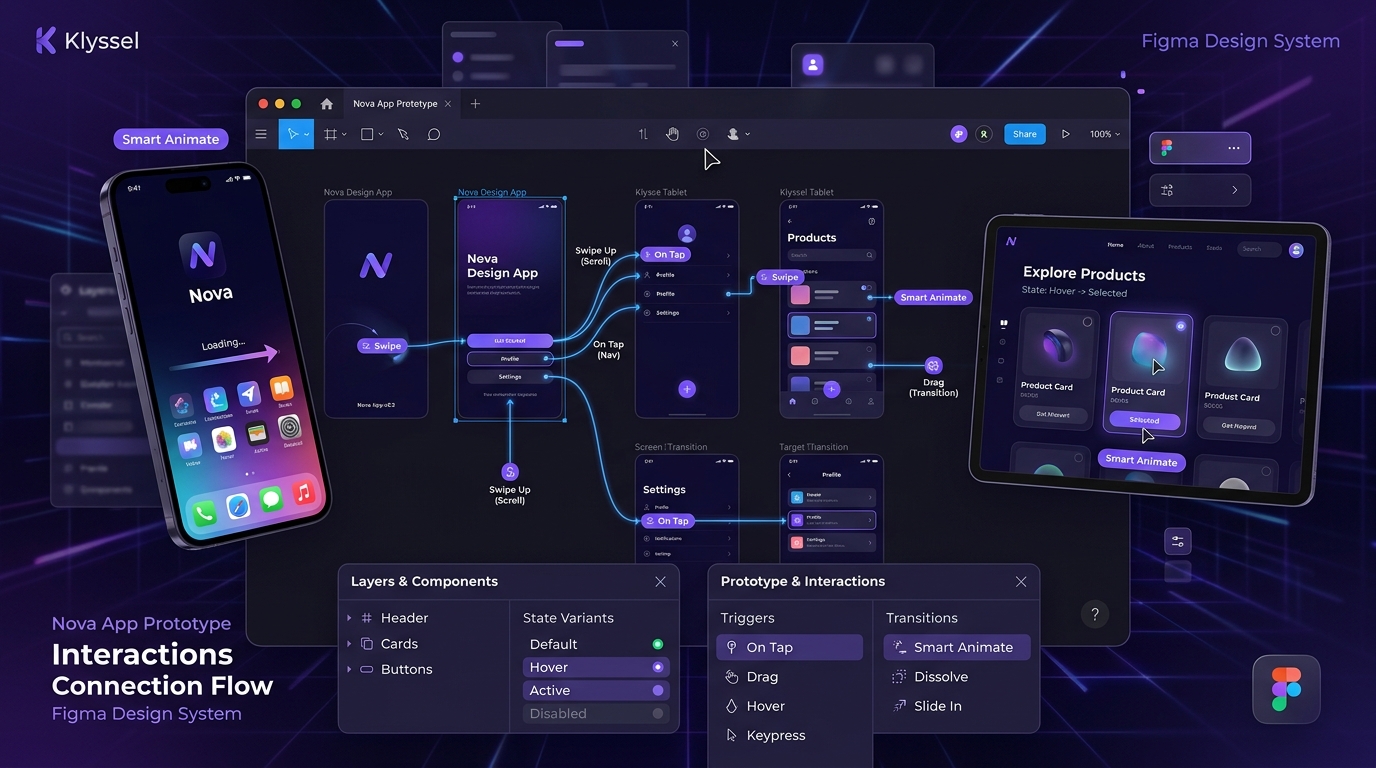
Interactive Flow Architecture & Micro-Interactions
An inside view into Klyssel's advanced Figma prototyping canvas: multi-surface mobile and tablet device frames, Smart Animate transition noodles, gesture triggers, and component state variants.
Measurable Operational Outcomes
Prototyping does not guarantee a specific reduction in development time or cost. Its value depends on the product, project stage, prototype scope, and how effectively findings are incorporated into development:
Earlier Validation
Test core workflows and value propositions before committing capital to backend engineering.
Stakeholder Consensus
Provide executives, investors, and engineers with a tangible, interactive demo of the product vision.
Reduced Ambiguity
Clarify micro-interactions, animation timings, and state changes far beyond static mockups.
Faster Feedback Loops
Uncover usability friction in hours of user testing rather than months of post-launch patching.
Prototyping velocity and validation efficiency depend on stakeholder feedback speed, test participant availability, and project technical complexity.
Architecture & Technology Stack
Klyssel Labs selects prototyping methods and tools according to the product and intended validation requirements.
Prototyping Engines
- Figma advanced prototyping & variables
- Smart Animate physics & easing curves
- Component state variants & nested interactions
- Touch, drag, hover & keypress triggers
- Overlay, drawer & modal modal animations
Interactive Elements
- Dynamic multi-step form validation
- Faceted search & filtering states
- Interactive charts & data toggles
- Sticky headers & scroll parallax flows
- Realistic simulated micro-copy
Multi-Surface Testing
- Native iOS & Android mobile framing
- Responsive iPad & tablet touch testing
- Desktop 1440px SaaS dashboard flows
- Figma Mirror live on-device testing
- Unmoderated Maze / UserTesting integration
Engineering Handoff
- CSS cubic-bezier easing documentation
- Interactive transition timing specs
- Design token variables & component links
- Empty, error, loading & success states
- Framer / web component sandbox demos
Klyssel Labs selects prototyping methods and tools according to the product and intended validation requirements.
Implementation Lifecycle
A disciplined engineering flightpath designed to validate business value before production scale.
Product & Prototype Planning
We identify the purpose of the prototype, target users, critical workflows, product requirements, validation questions, and level of fidelity required. A prototype intended for stakeholder demonstration may require a different approach from one intended for detailed usability testing.
UX Flow & Screen Preparation
We establish the necessary screens, user journeys, navigation structures, information architecture, and interaction requirements that will form the prototype.
Interactive Prototype Development
The selected screens and components are connected into realistic workflows. Interactions, states, navigation, forms, and other important behaviors are represented according to the prototype's intended level of fidelity.
Testing, Feedback & Refinement
The prototype is reviewed with stakeholders or tested with representative users where appropriate. Findings are incorporated into the design before the product moves into development.
Frequently Asked Questions
Key answers to common questions about architecture, system integration, security, and project delivery.
Experience the Product Before You Build It
A prototype turns an idea into something people can see, interact with, question, and validate. Klyssel Labs creates interactive UI/UX prototypes that help businesses test product concepts, align stakeholders, identify usability issues, and provide engineering teams with a clearer understanding of the intended experience.
Tell us what you're building, which workflows matter most, and whether the prototype is intended for validation, stakeholder alignment, investor presentation, usability testing, or development planning.
